VLC 3.0.12 and 3.0.13 automatic updater issue
This is only relevant to Windows users
Short version
- versions 3.0.12 to 3.0.13 are not able to update automatically anymore, and will require user action
- versions 3.0.11 and earlier should update automatically to 3.0.14
Description
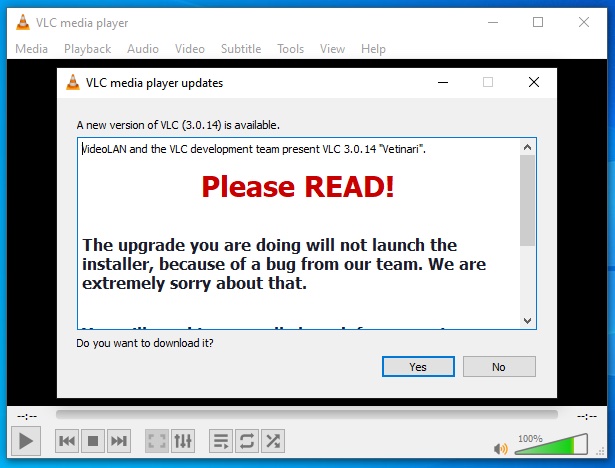
This notice applies to VLC 3.0.13 and VLC 3.0.12 users. Due to a mistake introduced in the automatic updater code, updates will be downloaded, verified for integrity, but will not be installed. This is bad and we would like to apologize for this.
Instructions
In order to update to 3.0.14, you will need to go to https://www.videolan.org/vlc/ to download and install VLC manually. You can find detailed instructions on how to do so here.
If you already ran the updater and it downloaded the installer, you can run it manually by opening a file explorer (Windows key + E, or just click the explorer icon) and enter %TEMP% as the location. You’ll see the installer there. It will be named «vlc-3.0.14-win32.exe» or «vlc-3.0.14-win64.exe» respectively depending on whether you’re using a 32bit or 64bit version of Windows.
Post mortem explanation
On May 10, 2021, the VideoLAN organization released VLC 3.0.13, and enabled auto updates. This usually would be fairly straightforward — a prompt would appear informing you that an update is available, you click download and install, and that would be the end of it. However and unfortunately, for this particular update, a few additional tedious (if not painful) steps will be necessary. The issue was introduced in 3.0.12, but it didn’t become obvious until we started rolling out 3.0.13. While the issue was fixed for 3.0.14, we can’t rely on that fix for people who’ve installed 3.0.12 already.
The commit that introduced the bug
The commit that fixed the bug for future releases
Download Updated VLC

Related links
Contact
For any questions related to this release, please contact us.
